Wix.com
Wix Site Scanner
An automated QA tool built on the Wix editor, simple enough for anyone to run, that grew into a cross-guild standard and was patented.
Role
Lead Product Designer
Timeline
2021
Surfaces
Scanner setup (main page), Results
Scale
Internal tool on the Wix Website Editor · adopted across the QA, Design and Support guilds · patented by Wix

TL;DR
Site Scanner turned a slow, manual QA process into an automated scan simple enough for anyone to run, whatever their technical background. It spread past the team it was built for into the QA, Design and Support guilds, becoming a tool people reached for by default.
Its success led to a company patent.
Project overview.
Wix's internal QA leaned on manual testing: checking sites by hand, with the overhead that comes with it. A small team set out to close that gap with an automated QA tool built for in-house teams.
The catch was where it lived. The tool ran directly on the Wix Website Editor, a complex platform that brought real restrictions to what the interface could do.
The main design challenge was making a complex QA system usable by people with very different technical backgrounds. The interface needed to make the workflow obvious, surface only what mattered, and help users move from scan to fix without understanding how the system worked underneath.
Approach

The main page
From a marketing-style landing page to a tool you can run on arrival.
The Problem
The page explained what Site Scanner was, but not how to use it.
Once users arrived it wasn't clear what they had to do. Two hard requirements, picking a scan template (a preset set of rules to check against) and adding a site link, were not surfaced as steps, so people clicked scan and nothing happened. The most common complaint was literally that the scan button did nothing.
What I decided
Reorganized the interface around the user’s workflow instead of the features.
I removed the marketing clutter and reorganized the page into an obvious sequence: choose a scan template, add the link, run the scan. The two blockers became visible parts of the flow instead of hidden prerequisites. Advanced users could still build their own check templates, but no one could stall on a requirement they couldn't see.
Result
A scan in clear steps, with no dead clicks.
The required actions and the template and link blockers were now obvious, so the "clicking scan does nothing" confusion was designed out and users could run a scan without being walked through it.
Outcome
Outcome


The results page
From an explosion of information to a page-by-page view people could act on.
The Problem
The results were an explosion of information with no clear next action.
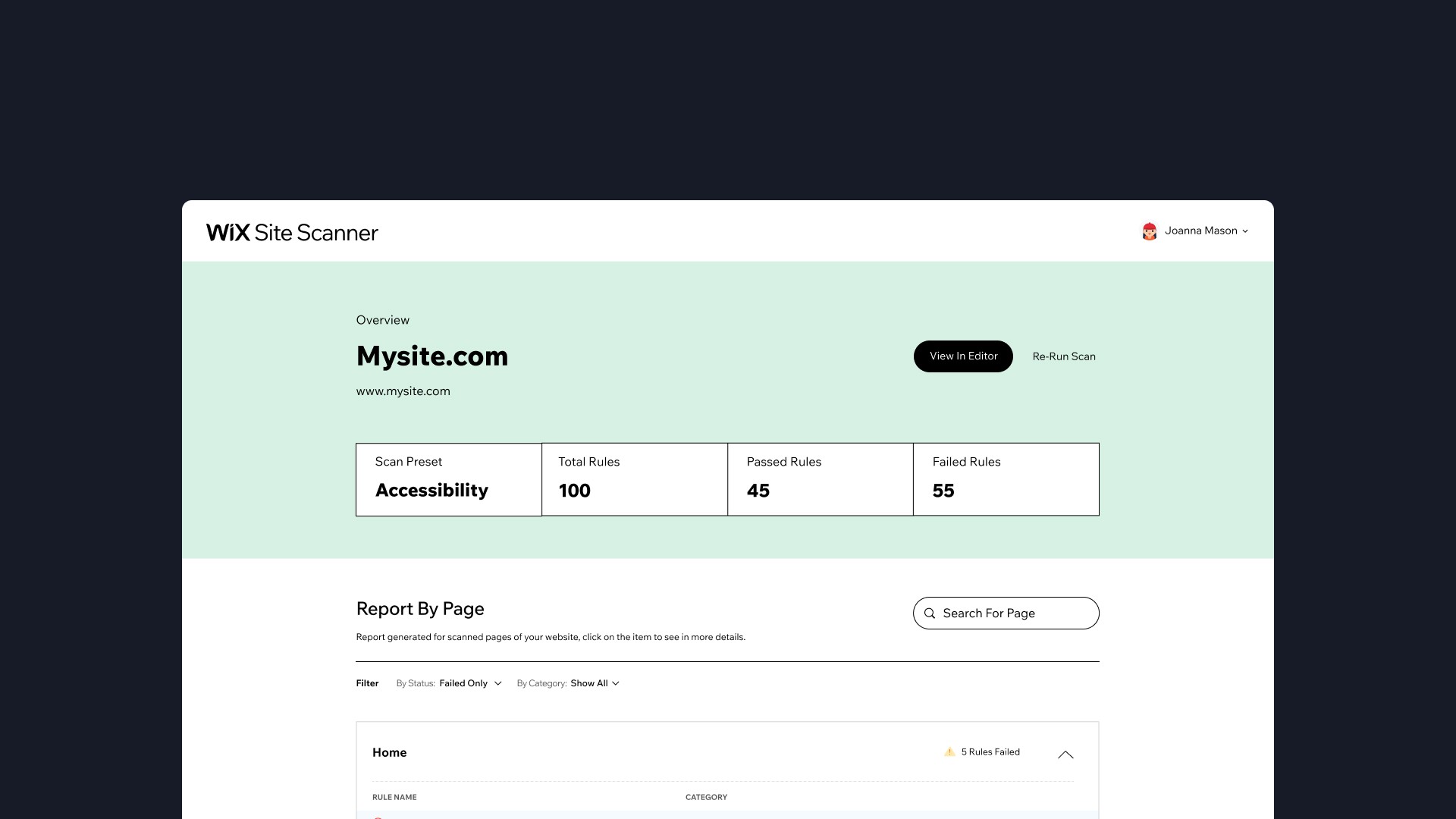
The data itself was useful, users said as much, but it all arrived at once and was hard to take in. People didn't know what to act on or what to do next. The problem was presentation, not content.
What I decided
Reorganize results around the site's own pages, with a path from problem to fix.
I led with a quick status overview tied to the check template used, then grouped findings by page using real page names instead of URLs so people could orient themselves. Each page became its own collapsible section, with each failed rule as a sub-item beneath it. Opening one slid out a drawer showing the affected elements as screenshots, a detailed explanation, and, for sites built on Wix, how to fix it.
Result
A wall of data became a page-by-page view people could act on.
The same information users already valued was now organized by the site's own pages and carried each finding from failed rule to fix, so a non-technical user could orient, prioritize, and resolve issues on their own.
Outcome
OUTCOME


Reflection
Site Scanner grew beyond its original audience and became one of Wix’s most widely adopted internal tools, used across QA, Design, and Support. Its success ultimately contributed to a company patent. The need Site Scanner proved existed, later informed an accessibility checker built directly into the Wix Editor. I wasn’t part of that work, but it grew from the same opportunity this project demonstrated.
More projects.
Check out the rest of the featured proojects I've worked on.


